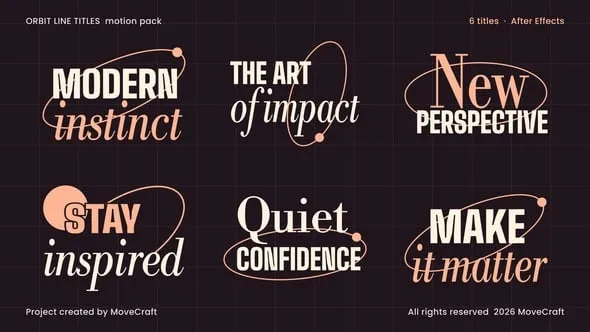
Six orbit line titles: tall condensed caps and an elegant Bodoni serif encircled by thin orbits that a small planet draws as it travels, with a rising sun and soft peach accents on a dark ground. Use them for openers, brand films, fashion, lifestyle, chapters and social clips.
Edit the wording directly in After Effects. Native text and shape layers keep every word, color and accent editable. Auto Resize measures each settled word, redraws its orbits and moves the planet and sun with it, reflows neighbouring lines and fits the whole design within width and height limits. Short text, line breaks and empty fields are supported. Very long copy becomes smaller to stay within the selected area.
Open RENDER and select CTRL. Its Title dropdown selects Title 1 through Title 6. IN Animation and OUT Animation checkboxes enable the entrance and exit. Change RENDER duration in Composition Settings: only the motionless hold changes, the entrance and exit keep their designed speed, and OUT follows the composition end. RENDER is transparent. Each Title has a Palette dropdown with six color palettes plus Custom colors.
No third-party plugins, footage or images are required. A detailed 12-page English PDF user guide (Help/Help.pdf) is included in the download: fonts, opening the project, choosing a title, every text layer, palettes and custom colours, layout, timing, independent copies, rendering with transparency and troubleshooting. Font files are downloaded separately from the official links in the guide.
- 6 animated title designs
- 1920×1080, 16:9, square pixels
- 30 frames per second
- 8-second source title compositions
- RENDER composition with a Title 1-6 selector
- Output duration set through Composition Settings; exit follows the composition end and the entrance and exit keep their designed speed
- 12 editable text fields across the six titles
- Orbits drawn by a travelling planet that parks beside the words
- Palette dropdown: 6 palettes plus Custom colors
- Native editable text and vector shapes; no images or footage
- Automatic width and height fitting with linked decorations
- Editable padding, spacing, position, scale and surface texture
- Motion Amount control, 0-200
- Independent copies through Essential Properties
- Transparent background by default
- Detailed English PDF user guide (12 pages) with font links