Source
https://assetstore.unity.com/packages/tools/modeling/polygon-material-painter-sub-mesh-editor-246853
Category
File Size
1.8 MB
Publisher
KAMGAM
Updated
September 11, 2025
Description
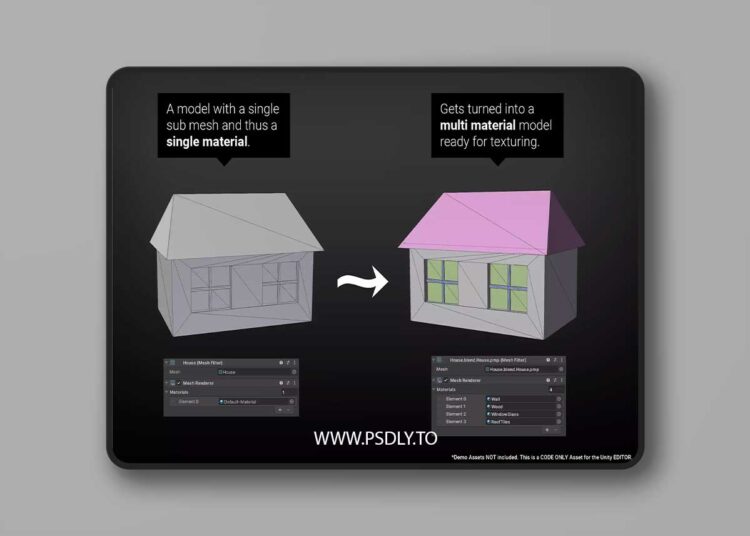
This asset is also part of the Mesh Tools Bundle 2 and 1. Create new sub meshes inside Unity for any model. Assign your materials with ease.
- Super easy to use: Draw on the mesh and then pick a material. Done.
- None-Destructive workflow: Automatically generates a new mesh asset (.asset file). Your original asset remains the same.
- Skinned Mesh Support: Keeps all your bone weights and animations intact. Please notice that the .obj file format does not support bones or animation. Thus that information can not be exported as obj.
- Brush for high-poly meshes: Though you should keep it under a hundred thousand triangles for best performance.
Undo/Redo for selections OBJ Export. In case you need to pass your new mesh around.
Preview
2 images 1 / 2

2 / 2

Download File
![Yellow Parrot Restaurant ( Restaurant Cafe Pub Diner Bar Dining Kitchen Parrot ) [5.2 – 5.8]](https://www.psdly.site/wp-content/uploads/2026/10/Yellow-Parrot-Restaurant-Restaurant-Cafe-Pub-Diner-Bar-Dining-Kitchen-Parrot-5.2-–-5.8-350x250.jpg "Yellow Parrot Restaurant ( Restaurant Cafe Pub Diner Bar Dining Kitchen Parrot ) [5.2 – 5.8] 4")